Lessons and slides, in one browser editor
One tool for the reflowing lesson and the clickable slide. No second licence for the other half.
Build responsive lessons from 38 block types, or Storyline-style slides with triggers, states and layers in Scenes. Send a review link, keep every version, and export SCORM, cmi5 or xAPI. It also opens the courses you already have.
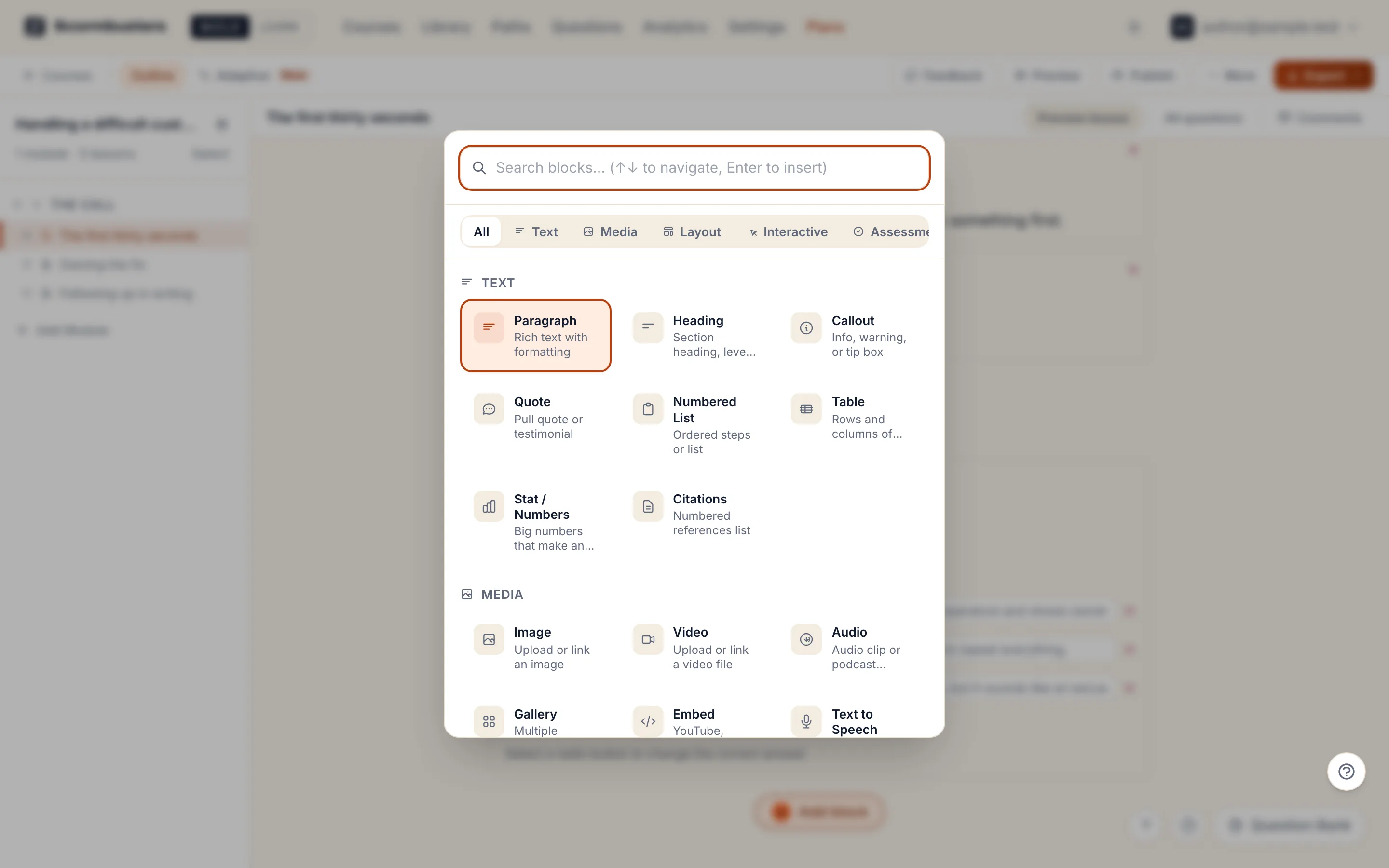
38 block types for lessons that reflow
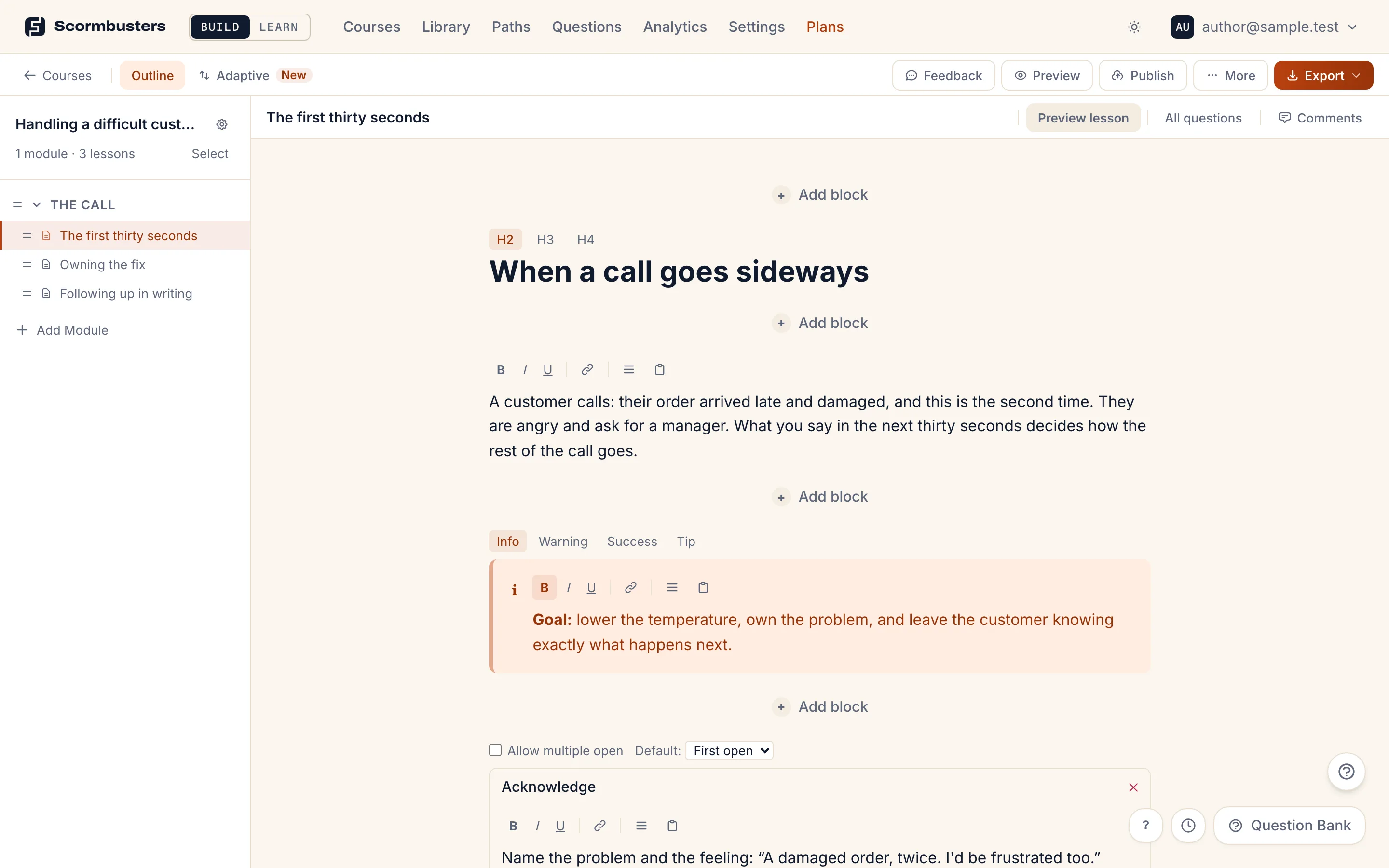
A lesson is a stack of blocks. Each one edits in place and previews as the learner sees it, on a phone or a desktop. 7 of them are graded questions; the rest are text, media, layout and interactions.
Text (8)
- Paragraph
- Heading
- Callout
- Quote
- Numbered List
- Table
- Stat / Numbers
- Citations
Media (6)
- Image
- Video
- Audio
- Gallery
- Embed
- Text to Speech
Layout (5)
- Two Column
- Cover Slide
- Button / CTA
- Divider
- Spacer
Interactive (11)
- Accordion
- Tabs
- Flashcard
- Timeline
- Process Steps
- Hotspot
- Labeled Graphic
- Scenario
- Custom Interaction
- Interactive Slide
- Continue Button
Assessment (8)
- Multiple Choice
- Multi-Select
- Reflection
- Fill in Blank
- Matching
- Hotspot Question
- Categorize
- Sortable
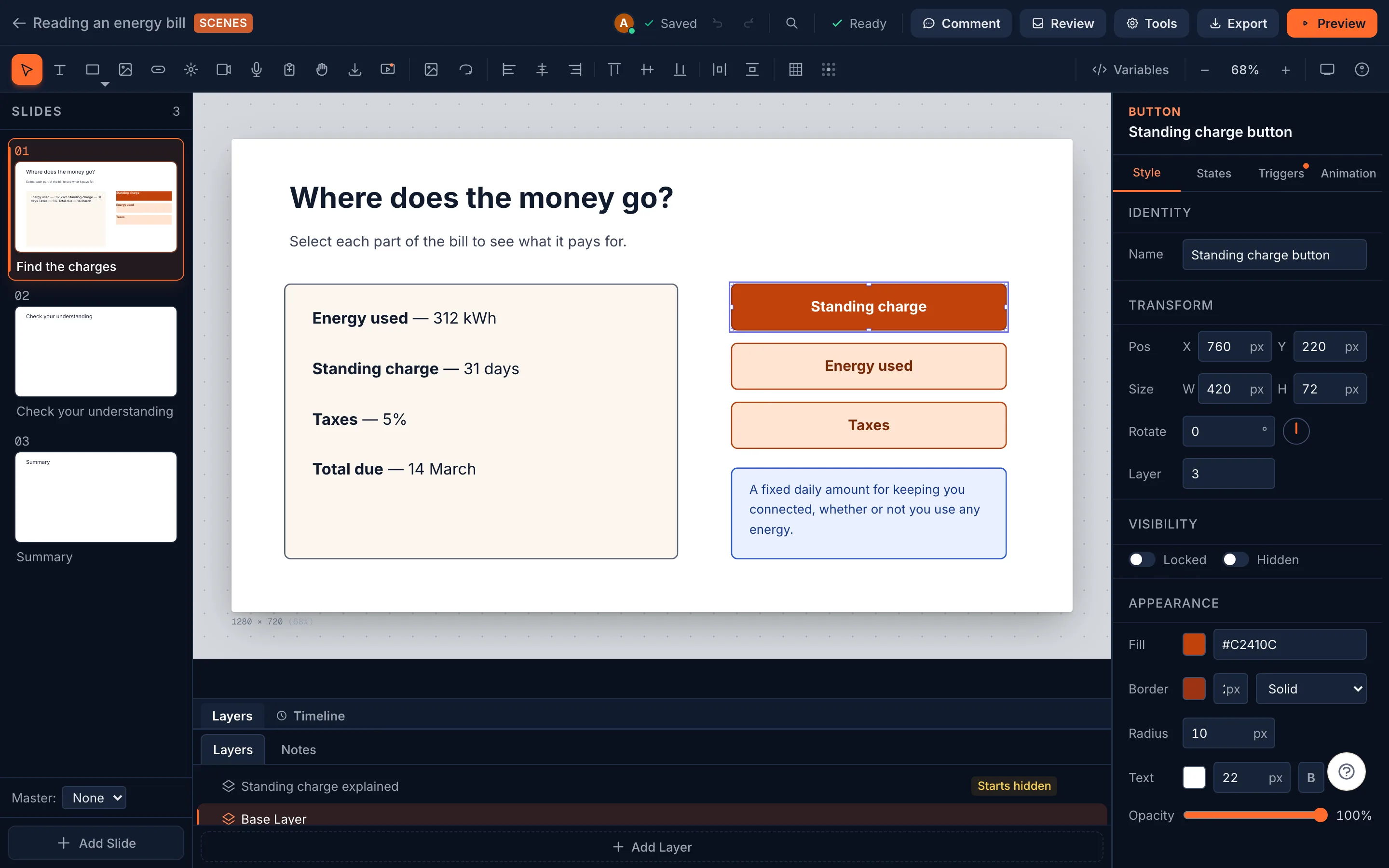
Slides with triggers, states and layers
When a page of blocks isn’t enough, Scenes is a slide editor in the same course: place objects where you want them, put them on layers, give them states, and wire them with triggers (9 events, 18 actions, with conditions). Master slides, a timeline and variables are there too.
Question pools and branching paths
- A question bank you can reuse across courses, and question pools that draw a new set for each attempt.
- A visual flow editor that routes learners by quiz score, choice or completion.
- Scenario blocks: a character, a choice, feedback, and the next step.
- A pass mark per course, and completion certificates if you want them.
Reviewers need a link, not a licence
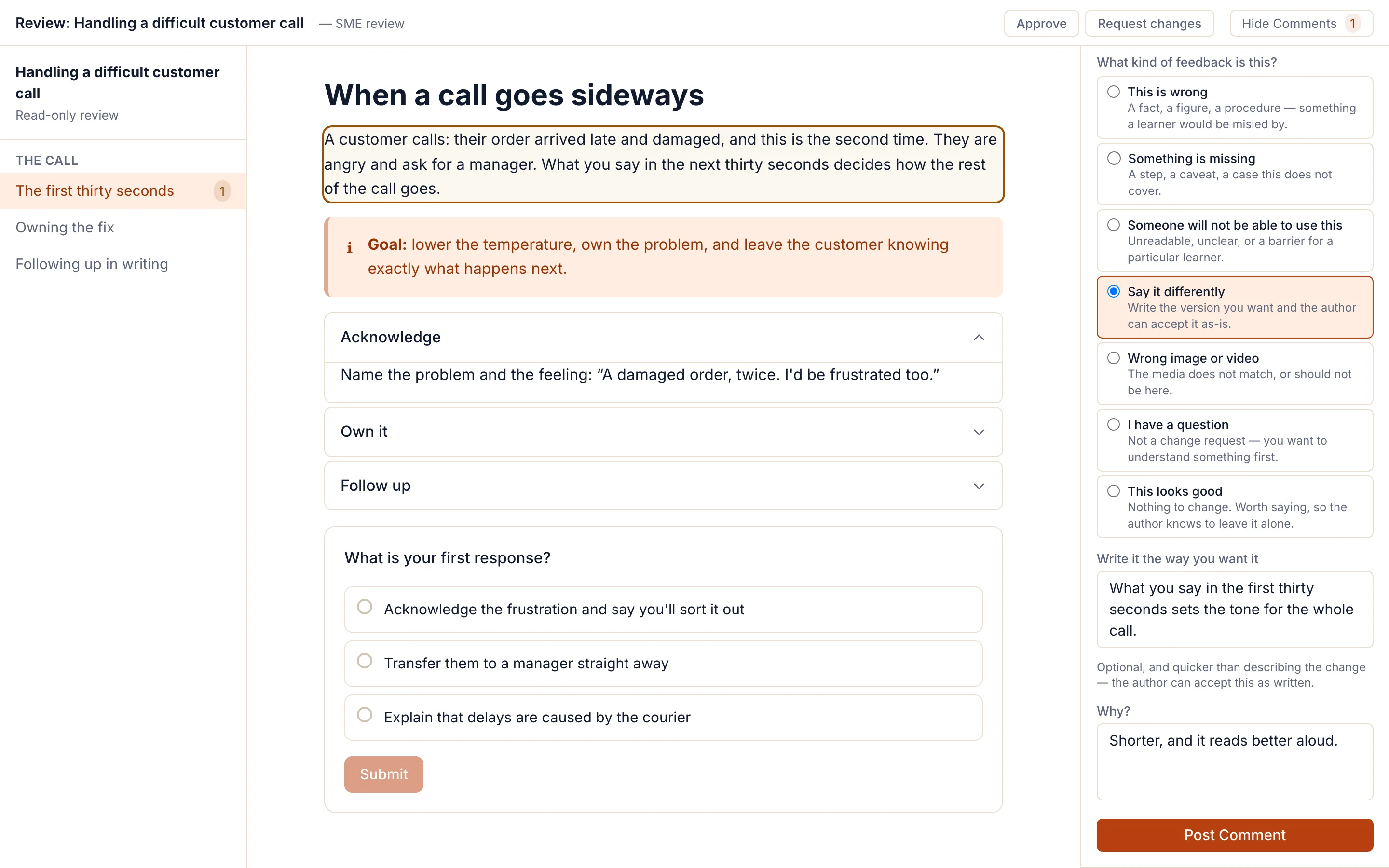
Send a review link. A subject-matter expert opens the course with no account and no seat, and picks what kind of change they want before they write, so the author gets a request instead of an essay.
What a reviewer can say
- This is wrong
- Something is missing
- Someone will not be able to use this
- Say it differently
- Wrong image or video
- I have a question
- This looks good
- Wording changes come with the reviewer's own replacement text, which the author can accept as written.
- Comments land in the author's inbox, sorted by urgency, with an email digest.
- Version history, and a compare view between any two versions or published packages.
- Several authors in one workspace, with roles; see who else is in a course while you edit it.
- Assigned authors: restrict a course so only the people assigned to it, and admins, can edit it.
Your own HTML, sandboxed and tracked
When no block does what you need, write it. A custom interaction runs your HTML and JavaScript in a sandboxed frame with no network access, and it can report a score and save its state in the LMS like any other block.
Checked while you write, not after
Blocks are designed for WCAG 2.1 AA: they reflow, work by keyboard, and every drag has a click-and-place alternative. The checker flags contrast, alt text and structure as you author. Your content and a human review still decide conformance.
What’s tested, and what isn’t →Standard packages, on every plan
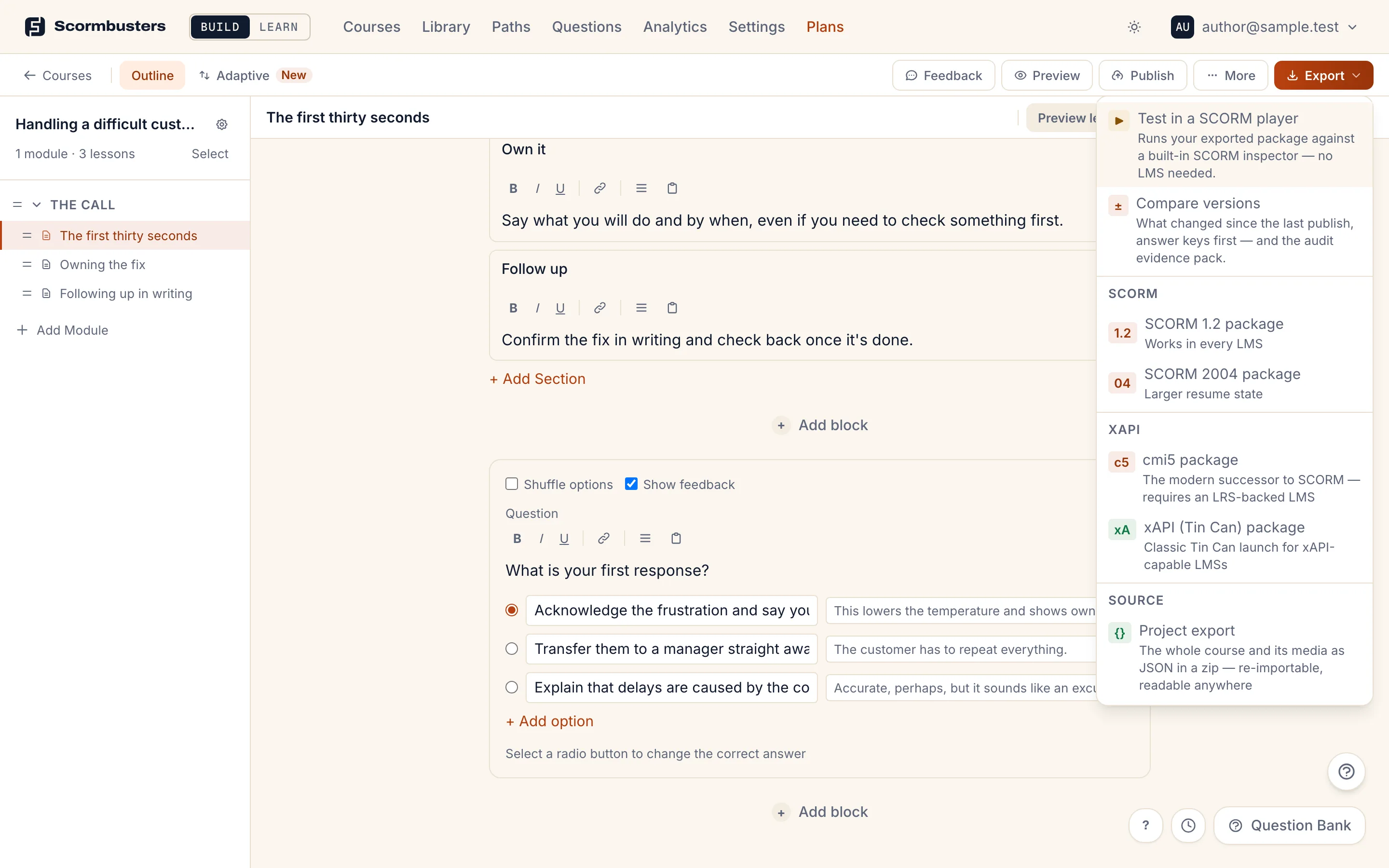
- SCORM 1.2, SCORM 2004, cmi5 and xAPI, with no Scormbusters branding in the package.
- A project export of the full editable source, one course or the whole library.
- Translations through XLIFF, shipped as one multilingual package.
- LTI 1.3 hosted delivery from Canvas or Moodle, in beta on Enterprise.
Your assistant, no credits
Connect the Claude or ChatGPT you already pay for over MCP (32 tools). It builds and edits courses with your permissions. Scormbusters never calls a model and sells no AI credits, and you can do everything by hand without one.
How bring-your-own AI works →It opens the courses you already have
Import a published Storyline, Rise, Captivate, Lectora or iSpring course, or any SCORM package, and it lands in this editor as ordinary blocks or Scenes slides. Words come across nearly whole; interactions about 46% of the time across 98 real courses, and the import report lists the rest.
Questions
Is Scormbusters an authoring tool or a converter?
An authoring tool that also converts. You build courses in it from 38 block types and the Scenes slide editor, and export SCORM, cmi5 or xAPI. It also imports published courses from other tools (98 real courses measured on every release), so an existing library lands in the same editor.
Do I need Windows?
No. Scormbusters runs in a web browser on Windows, macOS and Linux. There is no desktop app to install.
Do reviewers need a licence?
No. A review link opens the course for anyone who has it, with no account and no seat. Their comments land in the author's inbox.
What does it cost?
$20 a month for one author, or $149 a month for a team of up to 10. Never per seat, never per learner. Both start with a 14-day trial.