Review that tells you what to change
Your subject expert writes the sentence they want. You click apply.
Send a review link. Reviewers need no account and no seat, pick what kind of change they are asking for, and give the course a verdict. Their comments land in your inbox in order of urgency, keep their context when you edit, and every lesson keeps its history.
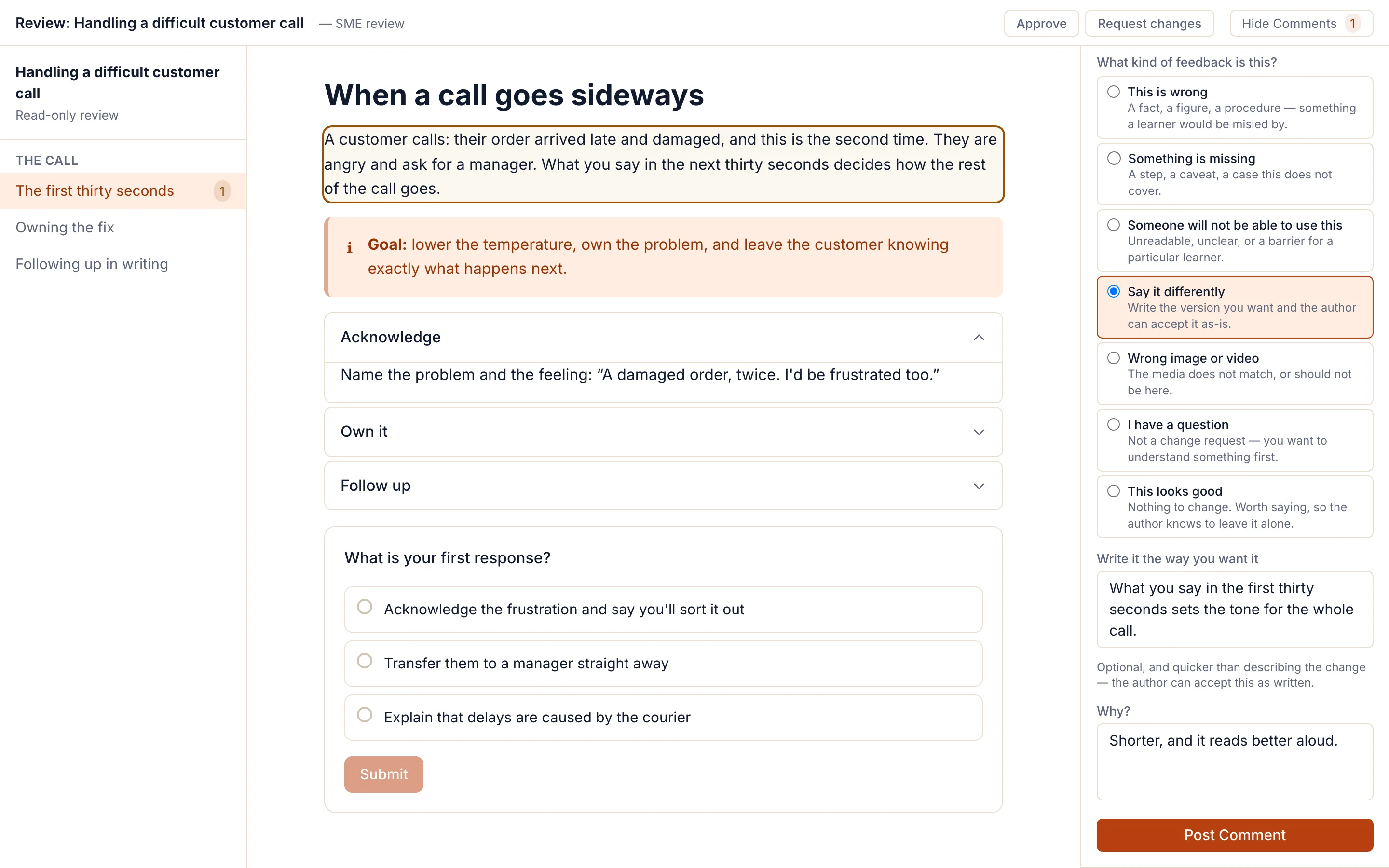
No account, no seat, no PDF of comments
Create a link from the course and send it, or enter the reviewer’s email and we send it for you. The reviewer sees the whole course as a learner would, block lessons and Scenes slides alike, and comments where they are.
- Reviewers are free and unlimited on every plan; they type a name, nothing more.
- A link works for 30 days. Revoke it at any time and the comments already left stay.
- Every author who can open the course sees its links, with how many comments each has and how many are still open.
Approved, or changes requested
Each review link carries the reviewer’s verdict: open, changes requested or approved. It shows as a badge next to the link, so the sign-off is in the tool rather than in someone’s inbox. A reviewer can take it back with the same button.
Comments keep their context when you edit
Every comment stores the text it was about. When you change the block, the comment is marked as edited since it was written; when you delete it, the comment says so and still shows what was there. You never have to guess what an old comment referred to.
Every version kept, compared and restorable
- Block lessons keep their last 20 versions; a Scenes course keeps its last 50.
- Name a version to keep it: pruning removes the oldest autosaves, never a version you named or the one taken before a restore.
- Restore any version. Compare the draft with a version or with what you published, on Designer, Studio and Enterprise.
What review doesn't do
- A review link is the only credential: anyone who has it can comment. There is no password option, so share it as you would a document link, and revoke it when the review is done.
- Links expire after 30 days. Make a new one for a later round; the old comments stay.
- Applying a suggestion as written only changes a block's main text, and only when nobody has edited that block since the comment. Anything else is a change you make by hand.
- On a Scenes slide, apply works when the slide has one text object; otherwise you make the edit by hand.
- No simultaneous typing in the same block. You see who else is in the lesson, and their saved changes arrive live.
- Verdicts are written to the audit log on Enterprise only.
Questions
Do reviewers need a licence or an account?
No. A review link opens the course for anyone who has it. The reviewer types their name, and that is all. Reviewers never use a seat, on any plan.
Can a reviewer just write the sentence they want?
Yes. When they pick "This is wrong" or "Say it differently", the form offers a box for the replacement wording, and the author can apply it as written with one click.
What happens to comments when I edit the course?
They stay, with the text they were about. Each comment is marked as still current, edited since it was written, or about content that has since been deleted, so nothing is silently orphaned.
Can two authors work on the same course?
Yes. Studio ($149 a month per organization) has up to 10 authors. Everyone in a lesson sees who else is there, and saved changes appear on their screens as they happen. Two people typing in the same block at the same moment is not supported.
Structured comments
Reviewers say what kind of change they want
The usual review cycle fails on prose: a paragraph from which you have to guess the change. Here the reviewer picks one of 7 kinds of comment, so you know before reading whether it is a correction, a gap, a question or a thumbs-up.